
Smart SIM Registration Method Guide Step-by-Step
Smart SIM registration is mandatory for all new and existing Smart subscribers in the Philippines under the SIM Registration Act, Republic Act 11934, to keep their SIMs active and continue using calls, texts, and mobile data. Register online through the web portal, Smart App, QR code, helpline, or Smart Store after completing the required registration requirements.
The process also supports minors, PWDs, foreign nationals, and companies, and users can check their registration status after completion. With over 55.2 million subscribers, Smart Communications also offers rewards and bonuses for selected prepaid and postpaid SIM activations. Below, we have provided a complete guide on smart sim registration.
What is the smart SIM registration?
Smart SIM registration is the process of submitting your personal details and valid identification to Smart Communications so your SIM can be activated or remain active under Philippine law. The official registration portal is available for Smart, TNT, and Smart Bro users.
SIM Registration Act
The SIM Registration Act (Republic Act No. 11934) requires all SIM users in the Philippines to register their SIM cards as a condition for use. The law aims to regulate SIM ownership and help reduce scams, fraud, and misuse of mobile communication services.
Who Must Register?
Registration is required for:
- Smart prepaid users
- Smart postpaid users
- TNT subscribers
- Smart Bro users
- New SIM card users (before activation)
- Enterprise customers (through authorized signatories)
- Foreign nationals, tourists, minors, and other special user categories (subject to additional registration requirements)
How to work the SIM registration Smart?
Register your Smart SIM online by following these steps:
- Open the official SIM Registration Smart or Smart Help page.
- Enter your Smart mobile number and verify it using the OTP sent to your phone.
- Fill in your personal details.
- Upload a valid government-issued ID and a clear selfie.
- Review your information and submit the form.
- Wait for the SMS confirmation of your successful registration.
Requirements:
- Smart mobile number
- Internet connection
- Valid government-issued ID
- Clear selfie
- Phone, tablet, or computer to complete the registration
How to use the smart SIM register?
Register your SIM on Smart’s official portal by entering your mobile number, verifying the OTP, and providing your full name, birth date, complete address, sex, nationality, a valid government ID, and a clear selfie. Registration is also available through the GigaLife app, and this use is free of charge.
After submission, wait for the SMS confirmation and keep your control number for tracking. For minors, a parent or guardian must register the SIM in their name. Always use the official Smart registration site to keep your calls, texts, and data active. So that you can protect against fraud.
Best Method for smart SIM registrations: online link & mobile app
Complete guide about the SIM registration smart method below.
Best Method for Smart SIM Registration Online

Best Method: Register Online
Use the official Smart Registration SIM portal to complete your registration online. The process includes:
- Register your SIM through the official website.
- Verify your mobile number using the OTP sent to your SIM.
- Upload a valid government-issued ID.
- Receive an instant confirmation once your registration is successful.
Why choose online registration?
- Fast and easy self-service process.
- Free to use.
- Accessible from any web browser.
- Works for both new and existing prepaid subscribers.
- Ideal for registering remotely or managing multiple SIM registers.
Best for you if:
- You have your SIM inserted in your phone to receive the OTP.
- You have a digital copy or clear photo of your valid ID ready for upload.
- You want to complete the registration without visiting a physical store.
Best Method for Smart SIM registration mobile app
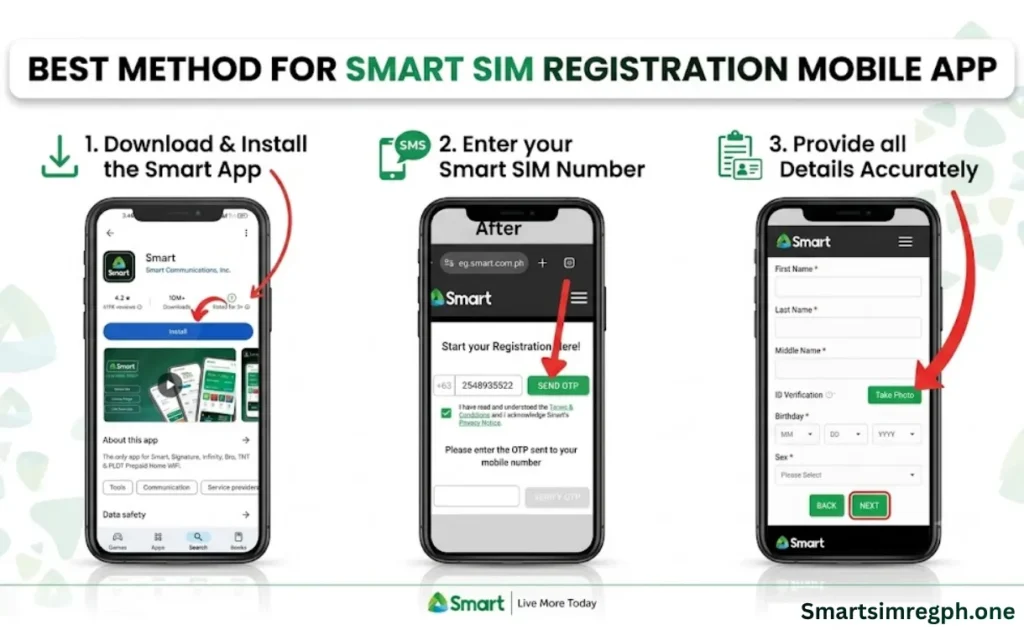
What It Is
Register directly through the operator’s official mobile app using your phone’s camera to capture your ID document and selfie. The app guides you through the entire verification process.
Why Use the Mobile App?
- Easy ID and selfie capture with built-in camera support.
- Automatically fills some account information, reducing manual entry.
- Mobile-optimized process helps minimize upload and formatting errors.
- Verification is often completed faster than browser-based registration.
How to Register
- Download and open the operator’s official app.
- Sign in or enter your mobile number.
- Follow the registration or verification prompts.
- Capture or upload your ID document and selfie using your phone’s camera.
- Review and accept the terms and conditions.
- Submit your registration.
- Check your verification status in the app or on the operator’s web portal.
Smart registration SIM requires a document.
Besides that, for this purpose, 5 things for registering a SIM card are required only here, first, now.
| Section | Details |
|---|---|
| Personal Information Needed | Prepare your full name, date of birth, sex, nationality, and Philippine address. Depending on the registration process, you may also need to provide your email address and an alternate contact number. |
| Accepted Valid IDs | You can use a Passport, Driver’s License, UMID, PRC ID, PhilSys National ID, SSS ID, GSIS e-Card, Voter’s ID, or other government-issued IDs accepted by Smart for SIM registration. |
| Documents for Foreign Nationals | Foreign residents typically need a passport, proof of Philippine address, and additional documents based on their visa status, such as an ACR I-Card, Alien Employment Permit (AEP), or school enrollment documents. |
| Requirements for Tourists | Tourists generally need a passport and travel-related documents. Their Registration Smart SIM is valid only for a limited period, according to Philippine regulations. |
| How to Register Your Smart SIM Online | 1. Visit the official SIM registration Smart portal. 2. Enter your Smart mobile number. 3. Verify the One-Time Password (OTP) sent to your phone. 4. Fill out the registration form with your personal details. 5. Upload a valid government-issued ID and a selfie for identity verification. 6. Review your information and submit your application. |
Problems & Solutions using Smart SIM Registration
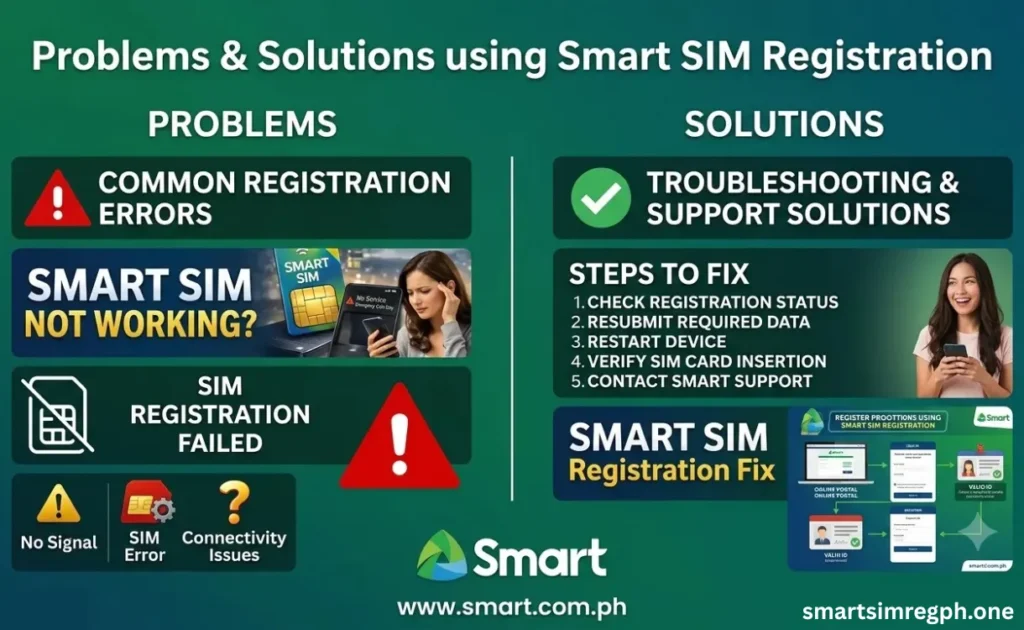
Most issues come from a weak signal, wrong OTP entry, blurry ID images, slow internet, browser, or app errors; check details before submission. Follow the guide below to resolve Smart SIM registration problems with clear steps and practical solutions easily.
| Problems | Solutions – What You Can Do |
|---|---|
| OTP Not Received | • Make sure your SIM is inserted correctly and has a network signal. • Check that your SIM can receive SMS messages. • Wait a few minutes, then request a new OTP from the official registration portal. |
| Registration Link Not Working | • Use the official registration website: smart.com.ph/simreg. • Avoid links from unofficial or copied sources. • If the page doesn’t open, try again later using a stable internet connection or a different browser. |
| Portal Not Loading | • Clear your browser cache and cookies. • Try another browser or device. • Switch to a stronger Wi-Fi or mobile data connection. • If traffic is high, wait a while and try again. |
| App Crashing | • Update the app to the latest version. • Restart your phone. • Ensure your device has enough storage and available memory. • If the issue continues, use the official web portal instead. |
| ID Upload Failed | • Upload a clear, well-lit photo or scan of your ID. • Make sure all corners are visible and the text is readable. • Avoid blurry, cropped, or low-quality images. |
| Selfie Verification Failed | • Remove sunglasses, masks, or anything covering your face. • Use good lighting. • Keep your face centered and clearly visible. • Retake the selfie if needed. |
| SIM Already Registered | • Check if your register smart sim has already been completed. • Save your confirmation message or reference number. • Contact customer support if you believe the registration status is incorrect. |
| Registration Pending | • Your registration may still be under review. • Wait for the confirmation SMS or status update. • Avoid submitting another registration while verification is in progress. |
How to Check Smart SIM Registration Status
Below, you can easily check your Smart SIM registration status by following the simple steps provided in this guide.
| Method | Steps to Check Smart SIM Registration Status |
|---|---|
| Smart SIM Registration Portal | 1. Visit the Smart SIM Card Registration Portal. 2. Log in using your registered Smart mobile number. 3. Click Verify Registration. 4. A pop-up message will confirm whether your SIM is registered. |
| GigaLife / Smart App | 1. Download and open the GigaLife (Smart) App. 2. Log in with your registered Smart mobile number. 3. On the dashboard, view your SIM registration status, along with your points and active subscriptions. |
Smart SIM card Registration Rewards
Check Smart SIM Card Registration Rewards to enjoy 3GB free data, exclusive GigaLife app promos, and unique promotional bundles.
| Reward / Benefit | Who Can Get It | Details |
|---|---|---|
| 3 GB Free Data | Smart Prepaid and TNT subscribers | Awarded after successfully registering an eligible SIM (subject to Smart’s promotional terms). |
| Exclusive GigaLife App Promos | Registered Smart subscribers | Access to special data and call/text offers available only through the GigaLife app after SIM registration. |
| Exclusive Promo Bundles | Registered Smart users | Eligible for special prepaid bundles such as Power All 50 and other data offers reserved for registered subscribers. |
Smart register SIM, Contact Us, and Helpline Number
| Category | Contact Details |
|---|---|
| SMART Link Hotline | *888 |
| contact number | (02) 888-1111 |
| Smart Communications, Inc. | |
| @livesmart | |
| Twitter/X | @smartpromos |
Best Video Guide Smart SIM Card Registration
People Also Ask
Is Smart SIM registration free?
Yes, Smart confirms that SIM registration is free, and users do not need to pay any fees during registration.
How to Register a Smart Postpaid SIM?
Complete Smart SIM card registration by texting YES to 5858. Await Smart confirmation. New postpaid users only automatically confirm previously submitted registration details after sending the required text message.
Can I register TNT using the Smart portal?
Yes, TNT SIM users can complete the registration process through the official SIM register Smart portal.
How to Verify Smart SIM Registration?
After Smart SIM registration, check for the confirmation SMS as proof of completion. Registration is automatically verified. If no confirmation arrives, check Smart’s SIM registration support pages.
Do I need to register a new SIM before using it?
Yes, every new SIM must be registered before it can be activated and used under the SIM Registration Act.
Are foreigners allowed to register?
Yes, foreigners can register their SIM, but they must provide additional documents depending on whether they are tourists or long-term visa holders.
How to Check Remaining Smart Data via SMS?
Use Smart SIM registration resources to check balance or remaining data. Dial *123# for data usage details; account type determines the displayed balance and data information through official support channels directly.
What happens if I do not register?
If a SIM is not registered within the required period, it will be deactivated according to the law.
Final Thought
Smart SIM registration is required for Smart, TNT, and Smart Bro subscribers under the Philippines’ SIM Registration Act. Register free through official channels using a valid ID, personal information, and selfie. Complete verification, check registration status, resolve issues if needed, claim available rewards, and keep your SIM active, secure, and compliant with Smart SIM registration. I hope the Smart sim registration guide is helpful for you.