How to Convert Smart Postpaid to Prepaid While Keeping
Switching from Smart Postpaid to Smart Prepaid is a practical option for subscribers who want greater control over their mobile expenses without losing their existing phone number. Through Mobile Number Portability (MNP), eligible users can migrate their account while keeping the same mobile number, making the transition smooth and convenient.
This guide explains the reasons for switching, eligibility requirements, necessary documents, the complete conversion process, and what to expect during activation.
Why Convert Smart Postpaid to Smart Prepaid?
Many subscribers choose prepaid because it offers greater flexibility and better control over mobile spending.
Benefits of Switching
- Lower monthly expenses
- No fixed monthly bills
- No long-term contract
- Freedom to choose prepaid promos
- Better control of mobile usage and spending
- Keep your existing mobile number through Mobile Number Portability
What is Mobile Number Portability (MNP)?
Mobile Number Portability (MNP) allows eligible subscribers to keep their existing mobile number when changing between Smart Postpaid and Smart Prepaid.
Instead of getting a new number, your current number remains active after the migration process is completed.
Eligibility Requirements
Before requesting a conversion, make sure your account meets these requirements:
- Your Smart Postpaid account is active.
- Any outstanding or final bill has been fully paid.
- Identity verification can be completed.
- You have your current Smart Postpaid SIM.
Documents You’ll Need
Bring the following when requesting the conversion:
| Requirement | Purpose |
|---|---|
| Valid government-issued ID | Identity verification |
| Current Smart Postpaid SIM | Existing mobile account |
| Fully paid final bill (if applicable) | Confirms account eligibility |
| Unique Subscriber Code (USC) | Required for MNP processing |
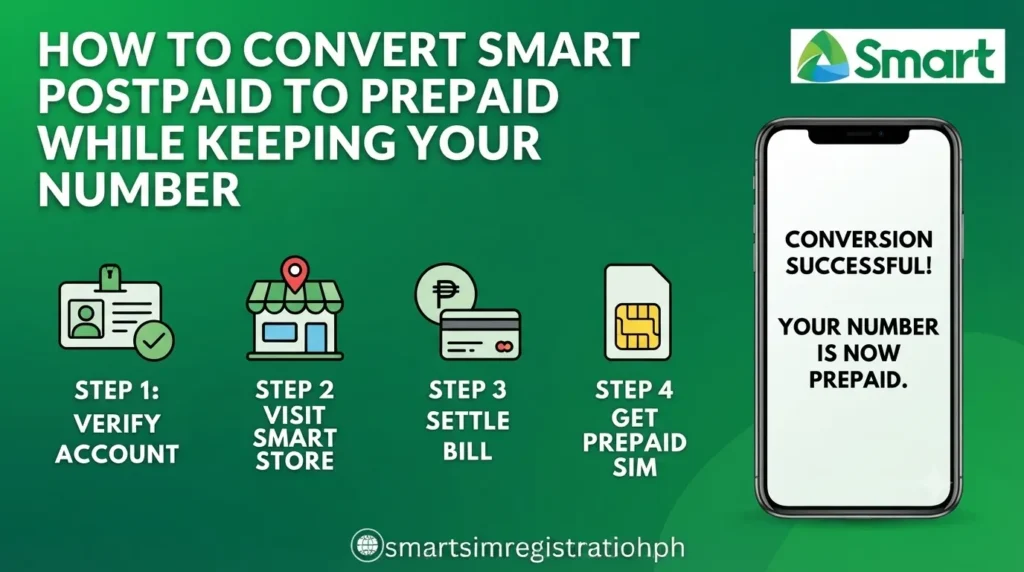
Step-by-Step Process to Convert Smart Postpaid to Prepaid
Follow these steps to complete the migration.
1. Visit a Smart Store
Go to a Smart Store and request to convert your Smart Postpaid account to Smart Prepaid.
2. Verify Your Identity
Present your valid government-issued ID so your account ownership can be verified.
3. Obtain Your Unique Subscriber Code (USC)
The USC is required to process your Mobile Number Portability request. It is issued after your identity has been verified.
4. Complete the Required Request
After verification, your conversion request will be processed according to Mobile Number Portability requirements.
5. Receive an MNP-Compatible SIM
If required, you will be issued a new SIM that supports the migration while retaining your existing mobile number.
6. Activate the New SIM
Follow the activation instructions provided. Activation may be completed in-store or through the available self-service process, depending on your situation.
7. Wait for the Migration to Finish
During the migration, your mobile service may be temporarily unavailable. Once activation is complete, your original mobile number will continue working on the new Smart Prepaid SIM.
Understanding the Unique Subscriber Code (USC)
The Unique Subscriber Code (USC) is an important part of the Mobile Number Portability process.
It is used to confirm your request to transfer between Smart Postpaid and Smart Prepaid while keeping the same mobile number.
To receive your USC:
- Request it during the conversion process.
- Complete identity verification.
- Use the USC when processing your MNP request.
SIM Activation
After receiving your MNP-compatible SIM:
- Insert the new SIM.
- Complete the activation process.
- Wait until migration is finalized.
- Temporary service interruption may occur during activation.
- Your existing mobile number will continue working after activation.
Quick Process Overview
| Step | Action |
| 1 | Visit a Smart Store |
| 2 | Request Postpaid to Prepaid conversion |
| 3 | Verify your identity |
| 4 | Obtain the USC |
| 5 | Complete the MNP request |
| 6 | Receive the new SIM |
| 7 | Activate the SIM |
| 8 | Wait for migration to complete |
Things to Remember
- Clear any outstanding balance before requesting the conversion.
- Bring a valid government-issued ID.
- Keep your current Smart Postpaid SIM.
- Temporary signal interruption during migration is normal.
- Your mobile number can remain the same after successful conversion.
FAQs
1. Can I keep my Smart mobile number after converting from Postpaid to Prepaid?
Yes. Through Mobile Number Portability (MNP), eligible subscribers can switch from Smart Postpaid to Smart Prepaid while keeping the same mobile number.
2. What documents are required to convert Smart Postpaid to Prepaid?
You’ll generally need your current Smart Postpaid SIM, a valid government-issued ID, and your account must meet the required eligibility conditions, including settlement of any final bill.
3. What is the Unique Subscriber Code (USC)?
The Unique Subscriber Code (USC) is a code used during the Mobile Number Portability process to help complete your request to move from Smart Postpaid to Smart Prepaid while keeping your number.
4. Where can I request a Smart Postpaid to Prepaid conversion?
You can request the conversion by visiting a Smart Store, where your identity will be verified and your Mobile Number Portability request can be processed.
5. Do I need to pay my outstanding balance before switching?
Yes. Any outstanding or final bill must be fully paid before your Smart Postpaid account can be converted to Smart Prepaid.
6. Will I receive a new SIM card after the conversion?
Yes. If required for the Mobile Number Portability process, you will receive an MNP-compatible SIM while keeping your existing mobile number.
7. How long does the conversion process take?
Processing time may vary, but the migration is typically completed within a few hours, depending on the processing requirements.
8. Will my mobile service be interrupted during the migration?
Yes. A temporary interruption in mobile service may occur while your number is being transferred to the new prepaid SIM. Service is restored after activation is completed.
9. Why do people switch from Smart Postpaid to Smart Prepaid?
Many subscribers switch to enjoy lower mobile costs, greater spending control, flexible prepaid promos, and the freedom of having no long-term monthly contract.
10. Can I activate my new prepaid SIM after receiving it?
Yes. Once you receive the MNP-compatible SIM, follow the provided activation instructions. After activation is completed, your existing mobile number will continue to work on your Smart Prepaid account.
Conclusion
Converting from Smart Postpaid to Smart Prepaid is a convenient option for subscribers who want lower mobile costs and more flexibility while keeping their existing phone number. By meeting the eligibility requirements, completing identity verification, obtaining a Unique Subscriber Code (USC), and activating the new SIM, you can successfully migrate your account through Mobile Number Portability with minimal disruption.