Paano Mag Register ng TNT SIM Card 2026 Complete Guide
Paano Mag Register ng TNT SIM Card: TNT SIM registration in the Philippines is mandatory before full mobile service use. Registration is completed through the official Smart/TNT registration portal or app.
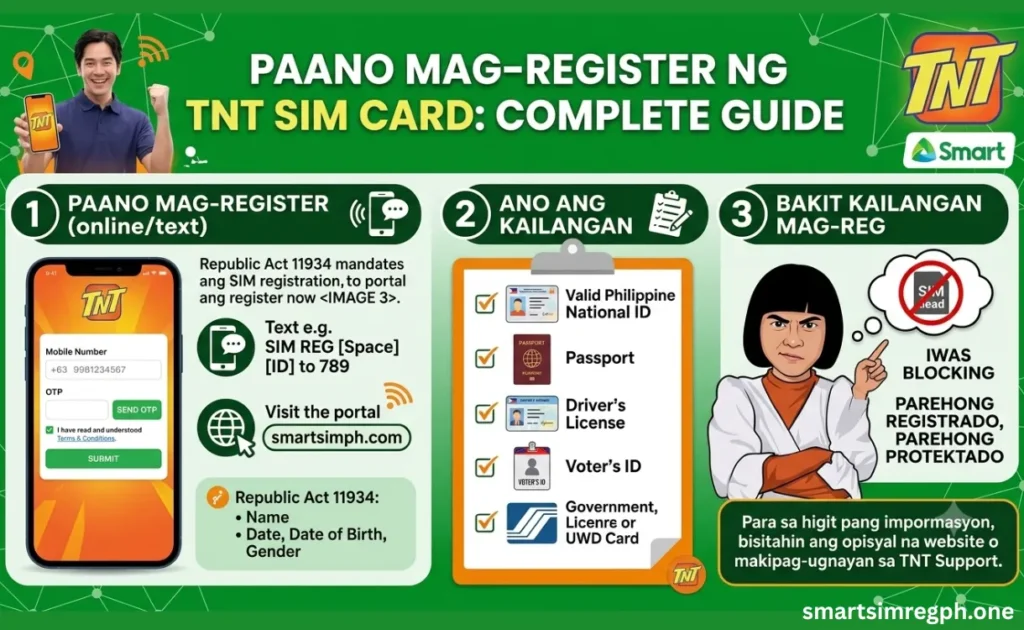
This guide explains the complete registration process with updated, practical information for Philippine users and requirements.
Why TNT SIM Registration Is Required
SIM registration in the Philippines is required to help verify mobile users, reduce fraud, scams, and misuse of mobile numbers. TNT follows the Smart registration system.
Unregistered subscribers may lose access to calls, texts, and mobile data.
For guidance, paano mag register ng sim tm before the enforcement rules apply for full service continuity and compliance.
Paano Mag Register Ng Sim Tnt – Step-By-Step Registration Guide
The standard TNT registration flow is simple and usually takes only a few minutes if your details are ready. Follow the steps below carefully and avoid refreshing the page while registering.
Open official portal.
Open the official TNT/Smart SIM registration website or the Smart/TNT registration entry page. Use only the official portal to complete your registration and receive a valid confirmation.
Enter number.
Type your active TNT mobile number correctly in the required field. Accept the terms and privacy notice if requested before continuing.
Receive OTP.
Click the button to receive the OTP. Wait for the one-time password sent to your TNT SIM, then enter the correct code. If it does not arrive immediately, wait for a short time before requesting another OTP.
Fill personal details.
Provide your full name, birthday, sex, nationality, address, and other required details exactly as shown on your valid ID. You may also need to enter your email address or an alternate contact number.
Upload ID and selfie.
Upload a clear photo of your valid ID and a clear selfie taken in good lighting. Make sure the images are complete, readable, and not blurry to avoid rejection.
Submit and confirm.
Check all the information before submitting the form. After submission, wait for the confirmation message or control number. Save or take a screenshot of the confirmation as proof that your TNT SIM registration is complete.
Common Problems and Fixes
If you encounter any issues during registration, don’t worry. Most problems can be resolved by following the recommended solutions below. For this purpose, read below.
| Problem face | Fix issues |
|---|---|
| OTP not received | Wait, ensure the TNT SIM is active, then try again later. |
| ID rejected | Use a clear, valid ID and ensure all details match. |
| Selfie upload failed | Take the selfie in good lighting and avoid sunglasses, masks, or blurry shots. |
| Page not loading | Try a different browser, a stable connection, or another device. |
| Registration failed | Review all entries, correct the displayed error, and submit again. |
Why TNT SIM Registration Is Required
TNT SIM registration in the Philippines is required to verify mobile users and help reduce fraud, scams, and misuse of mobile numbers. Users must register through the official Smart SIM registration platform because TNT is Smart-owned. Unregistered SIMs may lose access to calls, text messages, and mobile data when registration rules are enforced by authorities.
Requirements Before You Start
Before registering, prepare:
- A stable internet connection
- Your TNT SIM number
- A device that can receive OTP messages
- A clear photo of a valid government ID
- A selfie for identity verification
Illustrated Steps
Here is a simple visual-style flow for the TNT registration process available.
- Open the official TNT/Smart registration page.
- Enter your TNT number and request OTP.
- Verify the OTP.
- Fill in personal details.
- Upload a valid ID and selfie.
- Submit and save the confirmation.
This process is the same general flow reported in the official TNT/Smart registration materials and updated tutorials for Philippine users.
Accepted IDs
Accepted IDs include:
- Philippine Passport
- Driver’s License
- PhilSys National ID
- UMID
- SSS ID
- GSIS e-Card
- PRC ID
- Voter’s ID
- Other government-issued IDs
How to Register Using Smart Website
TNT users are directed to Smart’s official SIM registration system because TNT operates under the Smart network. Open the site, enter the number, OTP, personal details, upload ID, selfie, review, and submit. Use a browser on a phone, tablet, or computer for registration. This website is available for easy online access and completion.
How to Register Through Smart App
Some TNT registration instructions direct users to the GigaLife/Smart app for the registration entry point. Look for the SIM registration prompt or banner, then follow the same verification steps as the website. This process is Convenient if already logged in to manage your account in one place easily.
Registration via Link
Use the official Smart/TNT SIM registration page for safe TNT SIM registration. Avoid random social media posts, shortened links, and third-party websites because these method outdated or unsafe. If unsure, rely on official TNT pages, tutorials, and registration materials for accurate guidance.
FAQs
Is TNT SIM registration free?
Yes, SIM registration is free for all TNT users.
How do I check if my SIM is registered?
Check for the confirmation message, control number, or successful submission notice.
Can I register from a phone?
Yes. Use the official registration portal on your mobile phone or computer.
Is the official TNT registration site safe to use?
Yes. Use the official TNT site, safe or Smart registration portal only.
What file type should I use for uploads?
Yes, upload a clear image file showing your ID and selfie.
Can I register with only a SIM number?
No. OTP verification and identity details are also required.
Why is my ID rejected?
The ID may be unclear, invalid, or unsupported.
Is TNT the same as Smart for registration?
Yes. TNT uses the Smart SIM registration system.
Is there an SMS confirmation?
Yes. Successful registration may be confirmed through the system or SMS.
Conclusion
Registering your TNT SIM in the Philippines is straightforward when you use the official Smart/TNT system, prepare a valid ID, and enter accurate details. Once you finish the process and save your confirmation, your TNT SIM should be ready for use under the country’s SIM registration rules. paano mag register ng sim card, useful for you. Follow the above guide for knowledge of this app.